A road sign in AutoCAD: 72 minutes or 2? A case study with time and cost
Published 4 November 2026 · 🇷🇴 Română
In short: We took a real road sign to the Romanian standard SR 1848-3 and counted everything you do in AutoCAD from scratch: letters, spacing, borders, shields. Then the same sign in JointLib, with a time and cost estimate for a 30-sign project.
A road sign looks like a simple drawing: a rectangle, a few names, an arrow. Anyone who has drawn one to the Romanian standard SR 1848-3 knows better. Every gap between two letters comes from a table, and the size of the panel follows from the length of the text.
We took a real sign and counted everything you have to do. In short:
| In AutoCAD, from scratch | In JointLib | |
|---|---|---|
| Preparation: letters and symbols | about 54 hours, once | 0 |
| Town sign, two lines | about 20 minutes | about 1 minute |
| Junction diagram on a column | about 72 minutes | about 2 minutes |
| Project with 30 signs | about 18 hours 40 minutes | about 40 minutes |
The AutoCAD times and the time to fill in the form are estimates. The end of this article explains exactly how we got them and how to check them on your own sign. The letter and spacing counts and the generation time are measured.
Time is money
Take an ordinary project of 30 signs, 20 simple and 10 complex:
| In AutoCAD | In JointLib | |
|---|---|---|
| 20 simple signs | 400 min | 20 min |
| 10 complex signs | 720 min | 20 min |
| Total | about 18 h 40 min | about 40 min |
| Cost at €30/hour | about €560 | about €20 |
Saving: 18 hours and about €540 per project, without counting the 54 hours of preparing the library or the changes requested along the way.
The €30/hour rate is only an example. The sum for your office is simple:
\(\text{saving} = \text{hours saved} \cdot \text{your hourly cost}\)
The sign
A junction diagram on a column, on a motorway, with two directions and a customs point:
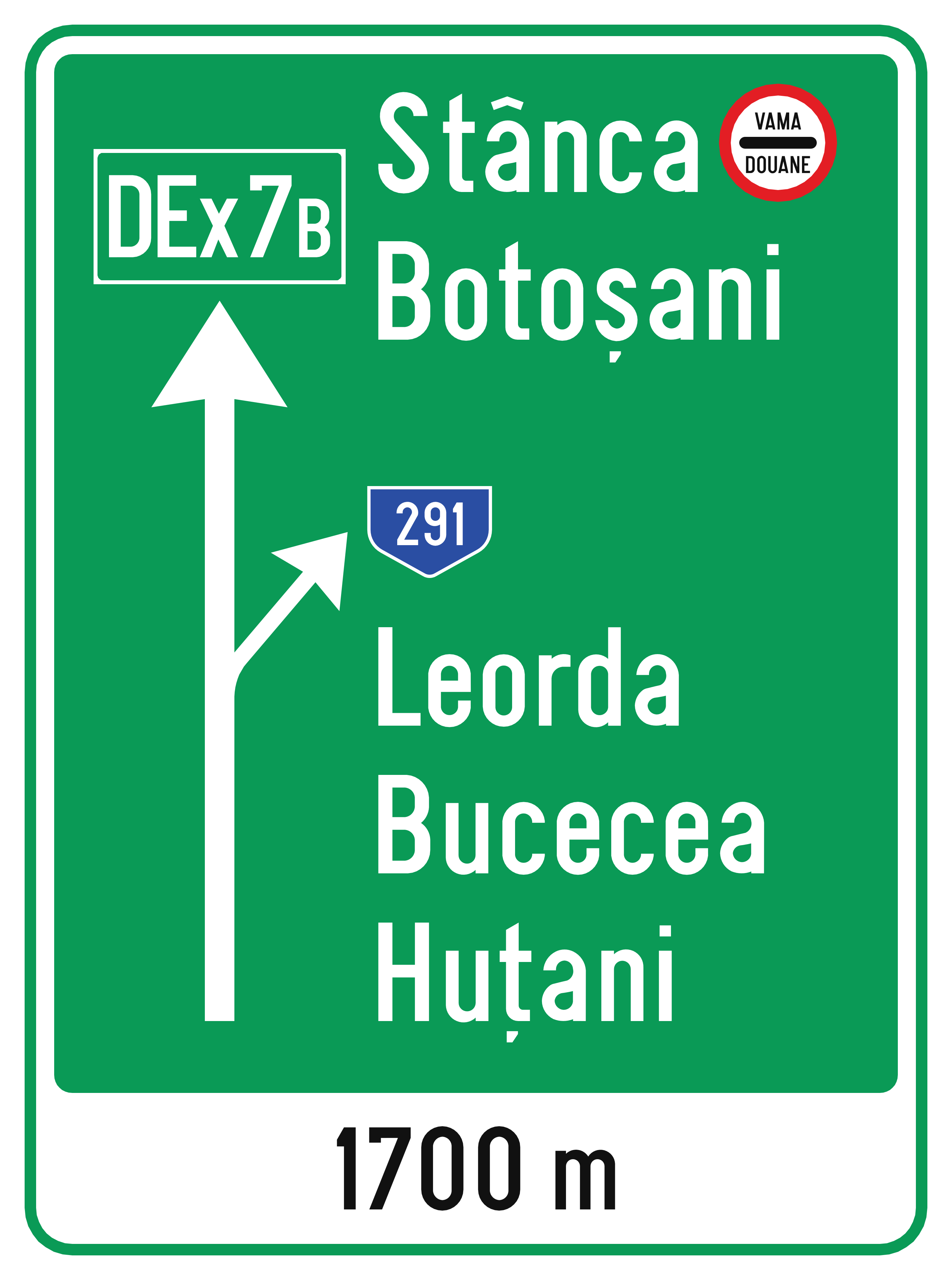
What it contains, as counted by the generator:
- size: 2750 × 3750 mm;
- 46 letters and digits, which means 34 gaps between neighbouring characters;
- 7 outlines: the panel, the borders, the fields;
- 2 road shields (DEx7B, DJ291) and 2 symbols.
Why it is hard in AutoCAD, from scratch
1. There is no font you can simply use
The letters of the standard are drawn in its figures, in two styles: normal and narrow. Our library holds 75 characters per style, so 150 blocks, plus 65 symbols and shields. If you truly start from zero, you draw them all from the figures.
At 15 minutes per block, that is about 54 hours, almost 7 working days, before the first sign. You only do it once, but you do have to do it. If your office already has the blocks, you still need to check they are complete: one missing letter stops you exactly when you need it.
2. The gap between letters is not constant
This is where most of the time goes. Tables 6, 7 and 8 of the standard give a coefficient y for every pair of characters, 2890 combinations in total. For the narrow style, the formula is:
\(d = y \cdot H \cdot \frac{5}{7}\)
For "Curtea de Argeș", with H = 200 mm, the gap between C and u has y = 0.22:
\(d = 0.22 \cdot 200 \cdot \frac{5}{7} = 31 \text{ mm}\)
That is one pair. Our sign has 34: find the group of the left letter, the group of the right letter, read the coefficient, multiply, move the block. Even at 30 seconds a pair, that is 17 minutes for spacing alone.
3. The panel depends on the text
Only once you know the length of each line do you know the width of the panel. The width gives the border and corner radius (table 3a), those give the margins (table 3b), and the length is rounded to the usual step. You cannot draw the panel first and the text afterwards.
4. Every change starts over
The client replaces "Leorda" with another town? You redo the spacing of that line. If it is now the longest line, the panel width changes, and with it the border, the margins and the position of everything else.
How long it takes in AutoCAD, step by step
We assumed you already have the blocks and work methodically. Each row is an estimate that you can replace with your own time:
| Task | Town sign (13 letters, 11 gaps) | Diagram on a column (46 letters, 34 gaps) |
|---|---|---|
| Letter height from table 1, scaling the blocks | 2 min | 3 min |
| Gaps between letters, 30 s per pair | 6 min | 17 min |
| Panel size, border and margins (tables 3a, 3b) | 4 min | 8 min |
| Outline and borders, with corner radii | 3 min | 8 min |
| Shields (5 min each) and symbols (3 min each) | – | 16 min |
| The diagram: stems, arrows, branch | – | 10 min |
| Checking against the standard, corrections | 5 min | 10 min |
| Total | about 20 min | about 72 min |
The same sign in JointLib
Open the road sign generator, no account needed:
- Choose the panel type, here the junction diagram on a column.
- Type the names, one per line. The sign above comes down to this:
Ahead:     Stânca {vama}
           Botoșani
Shield:    DEx7B

Branch:    Leorda
           Bucecea
           Huțani
Shield:    DJ291

Distance:  1700 m
- Click Generate. On the site, the sign above came out in 0.25 seconds (three runs: 0.29, 0.25 and 0.23 s).
- Check the drawing and download the DXF, which opens directly in AutoCAD. You can also download a coloured 3D model, as OBJ or DXF.
The part that took the time is no longer yours: the letters, the 34 gaps, the border, the margins, the shields and the customs symbol all come from the generator. {vama} puts the customs symbol at the end of the line, and the ? Guide button on the page shows every shortcut, with examples you can copy.
The change the client asked for becomes one word and one more click. The whole sign is recalculated.
If a name is too long, you get the solution straight away: "Write it on two lines: 'Vălenii' on the first and 'de Munte' on the second."
How we got these numbers
- Measured: the number of letters, gaps, outlines, shields and symbols comes from the generator, for the sign above. The generation time was measured on the site.
- Counted: the blocks in the library and the combinations in the spacing tables.
- Estimated: the minutes per task in AutoCAD, the 15 minutes per block, and the time to fill in the form (1–2 minutes, including checking the drawing). These are not stopwatch timings.
The best test is your own: time the next sign you draw, then make it in the generator too. It takes a few minutes and gives you the real figure for your office.